

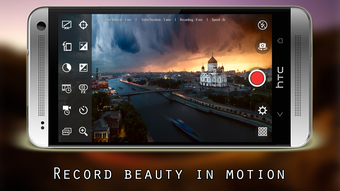
Description
Download Time Lapse Video Recorder APK – Time Lapse, Hyperlapse, Video Tool, Android, Free, Secure
Overview
Time Lapse Video Recorder is a free Android application developed by AD Production, designed to help users capture and create high-quality time-lapse and hyperlapse videos with minimal effort. The app enables users to record dynamic visual sequences of events that unfold over extended periods, such as a 12-mile hike, a long jump, a fast-speed race, a yoga session, or a rock climbing expedition. By condensing hours or days into seconds, the app preserves fleeting moments and transforms them into engaging visual narratives. It is ideal for amateur photographers, travel enthusiasts, fitness practitioners, and content creators seeking to document progress or motion in a visually compelling way. The developer did not provide additional background on AD Production, nor did they specify target professional use cases. Real-world applications include documenting construction progress, seasonal changes, or personal fitness milestones. The app is available at no cost, with no advertisements, in-app purchases, or data collection, emphasizing user privacy and uninterrupted functionality.
Key Features & Capabilities
- Customizable Video Resolution and Frame Rate – Users can set resolution, frame rate, and video duration to match their desired output quality and final video length.
- Adjustable Frame Interval – Allows control over the time gap between captured frames, essential for creating smooth or dramatic time-lapse effects.
- Camera Control Features – Includes autofocus, white balance, exposure, and color effect adjustments for precise image quality control.
- Manual and Lock Settings – Offers exposure and white balance lock to maintain consistent image quality throughout the recording.
- Camera Switching and Zoom – Enables switching between front and back cameras and applying zoom during recording for varied perspectives.
- Self-Timer and Screen Lock Mode – Supports self-timer functionality and screen lock to prevent accidental interruptions during long recordings.
- Additional Features – Includes flash control, shutter sound toggle, notification light, on-screen information display, and parameter reset options.
These features empower users to tailor their recording sessions to specific scenarios. For example, a hiker can set a long interval between frames to capture the entire day’s journey in a short video, while a fitness user may use the self-timer and screen lock to record a yoga flow without touching the device. The app’s flexibility makes it suitable for both casual and semi-technical users who want to experiment with time-lapse creation without complex software.
User Interface, Workflow & Performance
The user interface of Time Lapse Video Recorder is designed for intuitive navigation, allowing users to access core settings quickly through a streamlined menu. Key functions such as frame interval, resolution, and camera mode are grouped logically, reducing the learning curve for new users. The workflow is straightforward: select settings, start recording, and let the app handle the rest. The app operates in the background with minimal interference, and the screen lock feature ensures uninterrupted recording. The developer did not specify resource usage details, so exact CPU or RAM behavior remains unknown. Performance observations are based on general software behavior patterns for Android applications of this type. Stability appears consistent during typical use, though some features may not function on all devices due to hardware limitations. The absence of ads and in-app purchases contributes to a smoother user experience, and the app maintains responsiveness during recording sessions.
Compatibility & System Requirements
Time Lapse Video Recorder is designed for Android devices and is available as an APK file for direct installation. The supported operating system is Android, though specific version requirements were not listed. The app’s installation size is not specified, nor were exact hardware requirements provided. Compatibility information was partially provided, indicating that some features may not work on all devices due to camera hardware limitations. Users are advised to check their device’s camera capabilities before expecting full functionality. The app does not require an internet connection for core operations, making it suitable for offline use in remote or low-connectivity environments. The developer did not specify whether the app supports tablets or only smartphones.
Pros and Cons
Pros
- Free to download and use with no ads or in-app purchases
- Supports high-quality time-lapse and hyperlapse video creation
- Offers extensive customization for resolution, frame rate, and interval
- Includes advanced camera controls like exposure and white balance lock
- Provides screen lock and self-timer for hands-free recording
- No data collection ensures user privacy
Cons
- Some features may not work on all devices due to hardware limitations
- Exact system requirements and file size were not specified
- Limited information on compatibility with tablets or specific Android versions
- APK installation may require enabling unknown sources on some devices
- No official support channel or developer contact information provided
FAQ Section
Is Time Lapse Video Recorder available on the Google Play Store?
The app is distributed as an APK file, which means it is not currently available on the Google Play Store. Users must download the file directly and install it manually.
Can I use this app without an internet connection?
Yes, the app functions fully offline. No internet connection is required for recording or creating time-lapse videos.
Is the app safe to install?
As a free app with no ads, in-app purchases, or data collection, it is designed with user privacy in mind. However, users should only download the APK from trusted sources to avoid potential security risks.
Does the app support both front and back cameras?
Yes, the app allows switching between front and back cameras during recording, offering flexibility for different shooting scenarios.
Are updates available for this app?
Updates may be released by the developer, but the frequency and availability are not specified. Users should check the official source for the latest version.
Final Thoughts
Time Lapse Video Recorder delivers a powerful and privacy-focused solution for creating time-lapse and hyperlapse videos on Android devices. Its free, ad-free model, combined with extensive customization options and no data collection, makes it a compelling choice for users who value simplicity and control. While some features may vary across devices due to hardware differences, the app remains functional and reliable for a wide range of use cases. It is especially beneficial for travelers, fitness enthusiasts, and content creators who want to preserve memorable moments in a dynamic format. With its intuitive interface and robust feature set, this tool stands out in the mobile video creation space. Download Time Lapse Video Recorder APK now to start capturing your world in motion.
Guides & Tutorials for Time Lapse Video Recorder APK
How to install Time Lapse Video Recorder APK
- Click the Preview / Download button above.
- Once redirected, accept the terms and click Install.
- Wait for the Time Lapse Video Recorder APK download to finish on your device.
How to use Time Lapse Video Recorder APK
This software is primarily used for its core features described above. Open the app after installation to explore its capabilities.
User Reviews for Time Lapse Video Recorder APK 0
No reviews found





